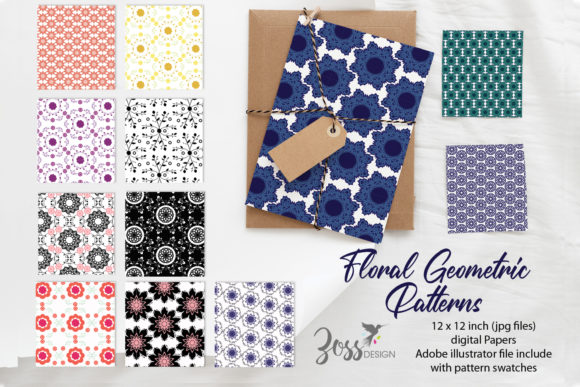
Spring Geo Florals Digital Patterns: Integrating Nature-Inspired Geometry into Your Creative Workflow
Spring Geo Florals Digital Patterns blend crisp geometric structures with delicate botanical motifs, all captured in fresh, seasonally relevant color palettes. These files are not just decorative elements; they function as ready-to-use design assets that slot into a wide range of creative and commercial projects. Whether you build brand identities, teach with visually engaging materials, or produce print-on-demand products, understanding how to acquire, adjust, and apply these patterns will save you hours while elevating the visual consistency of your work.
What Makes Geometric-Floral Patterns So Adaptable
The combination of geometric precision and organic floral shapes creates a visual tension that feels both modern and natural. Circles, hexagons, or repeating lines provide structure, while leaves, petals, and vines soften the overall effect. This balance means the patterns work equally well as large background panels, small accent borders, or isolated focal points. Spring color stories—soft greens, blush pinks, sky blues, and warm yellows—add a timely vibe without locking you into a single holiday or trend. Because the digital files can be recolored, scaled, and combined with other assets, they become a flexible resource rather than a one-off decoration.
Where Spring Geo Florals Digital Patterns Fit in Your Project Lifecycle
These patterns aren’t just a final touch applied at the end. You can use them at every stage of a creative or business workflow to guide decisions and streamline production.
Pre-project planning: Pull pattern swatches into a mood board or brand inspiration document. Their color harmony can inform a palette for the entire campaign, while the graphic style helps align visual direction with client expectations before heavy design work begins.
Active production: Use the patterns as backgrounds for social media graphics, website hero sections, presentation slides, or packaging layouts. Layer text over softened pattern blocks to create legible yet textural headings. Apply them to specific objects in product mockups—think fabric on a pillow mockup or wrapping paper on a 3D box—to preview real-world placement.
Post-project refinement: Add a patterned inside panel to a digital brochure or a patterned envelope liner to a stationery suite as a surprise detail. When a project calls for multiple deliverables, repurpose a single pattern across related items—business cards, thank-you notes, and email headers—to build a cohesive set without designing from scratch each time.
Practical Integration with Popular Design Tools
Most Spring Geo Florals Digital Patterns arrive as high-resolution raster files (JPEG, PNG) or versatile vector formats (SVG, EPS, AI). Your tool stack determines the best starting point. Vector formats allow infinite scaling without quality loss, making them ideal for large-format prints, signage, or any project that may need future resizing. Raster files work well for quick web graphics or digital planners when dimensions are already known.
- Adobe Illustrator and Affinity Designer: Open vector patterns and ungroup elements to recolor individual shapes, remove certain motifs, or extract a single icon for use elsewhere. Use the pattern swatch panel to create seamless repeating tiles.
- Adobe Photoshop and Affinity Photo: Place a high-res raster pattern as a layer, set blending mode to Multiply or Soft Light, and adjust opacity to merge it naturally with product photos or textured backgrounds.
- Canva: Upload pattern files to your brand kit. Apply them as image frames, background fills, or grid overlays. Canva’s color adjustment tools let you quickly shift hues to match your palette.
- Procreate or digital art apps: Import a pattern as an image and use clipping masks to add hand-drawn elements, or place it on a layer below line art for depth.
- Cricut Design Space and cutting machines: Use clean vector versions for print-then-cut projects, vinyl decals, or heat-transfer designs. Simplify the pattern to a single-color silhouette when needed.
Adjusting Colors and Scale Without Losing Quality
Color correction is often the first practical step. A pattern designed in a bright spring palette may clash with an established brand identity. In vector programs, select matching color groups and recolor globally. For raster files, use hue/saturation adjustments, gradient maps, or selective color tools. Scale is equally important: a dense pattern can overwhelm a mobile screen, while an oversized floral motif might look blurry on a small label. Always test patterns at actual output dimensions. Vector files handle scaling gracefully; raster files should be set to at least 300 DPI at final size for print work.
Building a Personal Pattern Library for On-Brand Efficiency
Treat your collection of Spring Geo Florals Digital Patterns as an inventory, not a one-click download that gets lost in a sea of folders. Create a structured directory with subfolders by season, style (clean geometric, watercolor florals, boho geo), and color family. Use descriptive filenames: SpringGeo_BlushFloral_HexagonTile_SVG rather than pattern23_final. Store everything in a cloud-synced location so you can access the same approved assets from multiple devices. For teams, a shared drive with preview thumbnails and a simple usage guide prevents well-intentioned but off-brand applications.
Workflow Scenarios Across Different Roles
Freelance social media manager: You manage Instagram and Pinterest for three wellness brands. Use one spring geo floral pattern in different recolored versions as the backdrop for quote graphics, weekly tip carousels, and story highlights. The geometric element maintains a modern edge that suits a professional audience, while the florals soften the feed. By creating a template set once and swapping out the pattern for each client, you reduce per-post design time from 30 minutes to under ten.
Print-on-demand entrepreneur: You sell phone cases, tote bags, and notebooks. Apply a seamless geo floral pattern to product mockups in Placeit or directly in your print provider’s design tool. Consider orientation and scale: a repeating diamond pattern may need careful alignment on a phone case’s edge. Order a sample before listing—what looks crisp on screen can print muddy if the file wasn’t saved in CMYK mode or at sufficient resolution. Once confirmed, the same file can generate dozens of product SKUs.
Educator or curriculum designer: You create printable worksheets and classroom decor. Use the patterns as full-page borders, section dividers, or subtle watermarks on handouts. Because spring themes aren’t tied to a specific holiday, the materials remain usable throughout the season. Print quality matters: test a sheet on your school or home printer to adjust ink saturation so the pattern doesn’t overpower the educational content.
Crafter and small-batch maker: You design wedding invitation suites or custom stickers. Drop a geo floral pattern into a circular sticker design, add text, and output multiples on a sheet. Use the same pattern in a lighter opacity for envelope liners. If you sell physical items, confirm your commercial license allows such use, and keep a record of license terms alongside the file.
Quality Control and Consistent Visual Output
Patterned backgrounds can distort, pixelate, or shift color dramatically between screen and print. Before publishing or sending to a client, preview the final file on two different displays. For print, run a test on the actual paper stock; uncoated paper absorbs ink differently and may mute pastel shades. A quick checklist helps: check resolution (300 DPI minimum for print, 72–150 DPI for digital), confirm color profile (CMYK for print, sRGB for web), and flatten or outline any live effects if sending to an external printer. If layering patterns over text, use sufficient contrast or a semi-transparent overlay between the pattern and the letters to preserve readability.
Extending the Life of a Single Pattern Set
A well-chosen digital pattern can generate content for months. Rotate through the included file variations—differently scaled, recolored, or adjusted with blending modes—to avoid visual fatigue. Combine two patterns from the same set using a layer mask to create a new hybrid look. Use isolated motifs (if vectors are provided) as standalone icons in a brand pattern library. If the license allows derivative work, you might even digitize hand-drawn additions to make the patterns distinctly yours, then save as new assets for future projects. This transforms a one-time purchase into an evolving toolkit.
Organizing for Collaboration and Scalability
When multiple team members access the same pattern files, inconsistencies creep in unless you standardize. Establish a lightweight style guide entry: list the approved color variants (with hex codes or swatches), specify the recommended pattern scale for different deliverables, and link to the source file location. In platforms like Figma or Canva for Teams, share a template page where patterns are already placed and masked, so colleagues drag and drop rather than import from scratch. This small investment in setup pays off during tight turnaround times.
Common Hiccups and How to Resolve Them
Even well-prepared files can cause friction. If a pattern appears with a white background instead of transparent, check the file type—JPEG files never have transparency, while PNG and SVG do. A color shift from design software to browser usually means the file is in CMYK and the browser is interpreting it as RGB; convert to sRGB before export for web use. Large file sizes may slow down cloud-based tools; batch resize raster patterns to the maximum dimensions you’ll actually use and save them as compressed but high-quality JPEGs. When a vector file won’t open, it may be an older version; re-export as an SVG for broad compatibility.
When you approach Spring Geo Florals Digital Patterns as more than just decoration, they become a structural component of your creative process. They reduce decision fatigue, reinforce visual identity, and speed up production across print and digital media. The key is not simply owning a beautiful set of patterns, but knowing how to fit them into your specific workflow—preparing them for your tools, adjusting them for your brand, and reusing them intelligently so that every project carries a trace of thoughtful design without starting from a blank canvas.