How to Use Rose Gold Foil Patterns to Elevate Design Projects Without Losing Efficiency
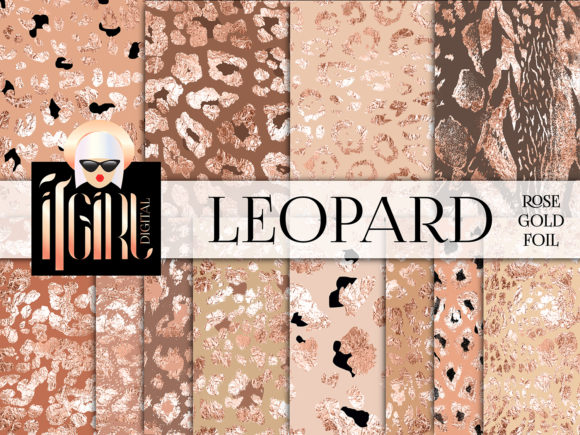
Rose gold foil patterns sit at the intersection of tactile luxury and digital convenience. They are high-resolution texture files, often vector or raster, that replicate the shimmer, reflection, and warm metallic blush of physical rose gold foil. For designers, marketers, and content creators, these patterns are not just decorative flourishes. When integrated thoughtfully, they become repeatable assets that support brand identity systems, reduce production time, and create consistent visual narratives across print and screen. This guide focuses on practical implementation: where rose gold foil patterns fit into real workflows, how they interact with other design tools, and what small adjustments make the difference between a flat result and a professional finish.
Understanding What Rose Gold Foil Patterns Deliver in a Creative Process
A rose gold foil pattern is not a one-click solution. It is a resource that behaves differently depending on file format, blending mode, background color, and output medium. Most high-quality patterns arrive as seamless JPG tiles, PNG overlays with transparent backgrounds, or fully editable AI/EPS vector files. The vector versions are essential for scaling across large-format signage, while transparent PNGs work better in digital mockups and layered compositions inside Photoshop, Canva, or Affinity Photo. Recognizing the technical nature of the asset is the first step in planning where it will live in your project pipeline.
This material sits upstream in many creative workflows. Before selecting a palette or finalizing a layout, you might test a rose gold foil pattern against a brand’s core colors. You may use it during the final polish stage of a wedding invitation set to add a premium cue, or after a packaging design is approved to generate alternative luxury line extensions. The pattern becomes a tool for visual permission: it signals sophistication, warmth, and a subtle metallic edge that flat colors cannot easily replicate.
Where Rose Gold Foil Patterns Interact With Other Tools and Decisions
These patterns rarely work alone. They interact with typography, photography, illustration, and spatial layout. When you apply a rose gold foil texture over a sans-serif wordmark, the interplay of light and shadow can make letterforms feel embossed. Over a dark charcoal background, the rose gold appears luminous and modern; over cream or blush paper stocks, it reads as an extension of a soft romantic palette. These interactions need to be tested across the tools you already rely on.
In Adobe Illustrator, linked vector foil patterns can be adjusted globally, so changing the foil scale updates all instances across business cards, letterhead, and envelope liners. In Photoshop, using overlay or soft light blend modes on a foil PNG allows the underlying photo or texture to peek through, which is critical for product mockups. In Canva, where blend modes are limited, you might layer a semi-transparent PNG and adjust opacity manually. Understanding these technical constraints early prevents rework and ensures the final export matches your intention.
The patterns also coordinate with print specifications. A design destined for foil stamping on physical stock will need a separate spot color layer, but a digital rose gold foil pattern can simulate the effect during client approval before committing to expensive production. This dual role—as a preview tool and a final digital asset—makes the pattern a strategic bridge between planning and execution.
Practical Implementation Across Multiple Workflows
Not all uses of rose gold foil patterns are visual. They influence speed, consistency, and decision-making. Consider three concrete scenarios:
Branding and Identity Projects
When developing a visual identity for a beauty, lifestyle, or stationery brand, you may define a primary palette, secondary textures, and accent materials. Rose gold foil often functions as a supporting texture that elevates premium touchpoints like gift cards, loyalty program mailers, or e‑signatures. By storing the pattern in a shared brand library (Creative Cloud Libraries, Figma team files, or Canva brand kits), you ensure every team member applies the same foil at the same scale, avoiding drift over time. This approach reduces the repetitive cycle of re‑searching for assets and guarantees a unified outcome across 20 different social media templates.
Digital Product and Marketing Asset Creation
For bloggers, course creators, and entrepreneurs who sell digital invitations, planners, or social media kits, rose gold foil patterns become part of a reusable template system. You might create a master PSD with smart object layers where the foil can be toggled, recolored, or swapped for a different metallic finish—rose gold, gold, or silver—without rebuilding the design. This modular setup cuts per‑product creation time by half once the initial master file is established. The key is organizing patterns with clear naming conventions (rose-gold-foil-horizontal-300dpi.png) and grouping them in folders that match your output categories.
Event Stationery and Publishing Workflows
In wedding invitation suites and editorial layouts, rose gold foil patterns often replace a solid color background or act as a decorative border. Instead of designing from scratch for each piece, a publisher could pre‑load the pattern into paragraph styles, frame borders, and header accents in InDesign. This allows a layout artist to apply the rose gold foil to any element with a single click, speeding up layout revisions and maintaining strict consistency across an 8‑page menu booklet or a series of place cards. The foil pattern then becomes a functional part of the publishing grid, not a last‑minute decoration.
Preparing Your Pattern Library for Smooth Integration
Before you drop a rose gold foil pattern into a live project, invest time in preparation. Quality control begins at the source. Purchase or download patterns from reputable marketplaces that supply properly seamless tiles and include both raster and vector options. Check the resolution: for print, 300 DPI at final output size is the minimum; for web, a lower‑resolution preview can be used in mockups but the source file should remain high‑fidelity. Inspect the pattern for repeating artifacts, unnatural seams, or color shifts that might appear when tiling across large backgrounds.
Once verified, organize patterns by tone and foil behavior. Some rose gold patterns lean more pink, others more copper. Create a simple visual reference card inside your design tool that shows the pattern at 100% scale against white, black, and a mid‑tone background. This quick comparison eliminates guesswork when selecting the right asset for a moodboard or client presentation.
Compatibility matters, too. If your workflow switches between vector and raster software, keep both a SVG or AI file and a transparent PNG on hand. Avoid opening vector files with embedded raster effects that may not transfer cleanly. A small upfront check saves hours of troubleshooting when you’re exporting final files on a tight deadline.
Maintaining Consistency and Quality Over Time
Once integrated, rose gold foil patterns should behave like any other design token in your system. Assign them a documented role in your style guide: note the exact blend mode, opacity, and scale used in standard templates. When a new team member creates a flyer, they should not have to reinvent the foil treatment. This discipline extends to client handoffs. Provide the final pattern file along with a brief spec sheet that explains how it was applied, so the client’s internal team can replicate the look without distortion.
Long‑term use also means versioning. If you update the pattern file because you found a more refined seamless version, save the old pattern in an archive folder and roll out the update across all active templates. This is especially important for businesses that offer seasonal product lines—a rose gold foil pattern used in a holiday collection may need to remain untouched for reprints a year later. Consistency in the file name, metadata, and storage location preserves the original outcome.
Use Cases That Go Beyond Decoration
Rose gold foil patterns can serve functional roles in workflows when you think beyond surface beauty:
- Accessibility testing: A subtle foil overlay can reduce harsh contrast on bright white stock, making text more readable without sacrificing elegance.
- Visual hierarchy: Apply the pattern selectively to draw the eye toward a call‑to‑action or a key quote in a presentation. The metallic effect acts as a non‑color highlighter.
- Mockup realism: When selling print‑on‑demand products, replace flat placeholder colors with a foil pattern to help customers visualize the final product’s texture, increasing conversion on product pages.
- Learning resources: Educators creating slide decks or worksheets can use a faint rose gold pattern in headers or dividers to establish a calming, professional visual theme that makes materials feel cohesive without overwhelming content.
Common Pitfalls and How to Avoid Them
Even a beautiful pattern loses impact when applied without care. The most frequent mistake is scaling inconsistency. A foil pattern stretched to five times its intended size loses detail and looks like a pixelated afterthought. Always scale proportionally and use the pattern’s native resolution as your guide. Another issue is over‑application. When every surface carries the same strong foil texture, the design feels heavy and dated. Use the pattern on one hero element—a feature background, a monogram, or a strip along the edge—and let neutral space do the rest.
Color interaction surprises are also common. Rose gold foil placed over a vibrant magenta or orange can create an unintended muddy blend. Test the pattern over every background color that appears in your template system, especially if your brand palette includes warm analogous hues. Adjust the pattern’s hue, saturation, or blend mode until the metallic quality reads clearly rather than competing.
Integrating Rose Gold Foil Patterns Smoothly Into Your Routine
Start small. Identify one repeatable project where a foil pattern can replace a solid accent, such as the banner on an email newsletter or the background of a quote card for Instagram. Implement the pattern, document the steps, and measure the result: did it reduce time spent on visual refinement? Did client feedback mention a more premium feel? Use that proof point to expand into additional assets. Over time, your pattern library, blend mode recipes, and template setup become institutional knowledge that frees up mental energy for higher‑order creative work.
Collaboration also improves. When every team member works from the same prepared assets, the question shifts from “Which foil should I use?” to “How can we use our foil texture to make this message clearer?” That shift from asset hunting to strategic implementation is where the real value of rose gold foil patterns lives. The pattern becomes a quiet, reliable tool in a broader system—not a fleeting trend, but a durable element that lifts ordinary layouts into something intentionally refined.